Home >
Community >
Software to Draw Laboratory Apparatus
Upvote
VOTE
Downvote
+ Software
+ Chemistry
Posted by
P Lt
Software to Draw Laboratory Apparatus
The short answer to this topic is that the typically used programs for this
tasks vary in their coverage of of lab ware to prepare such illustrations and
focus on drawing molecules, exporting molecules in machine readable (chemical)
formats understood e.g., by databases, and performing some computations (e.g.,
averaged molecular and isotopic weight). Beside popularity of the programs if
you want to share/collaborate with colleagues intermediate files, an additional
point to consider are the graphic formats these programs offer for file I/O.
Thus, a native export of the .svg formats understood e.g., by
inkscape may be an advantage.
Without aim to provide an exhaustive description, the following examples may
illustrate this with templates and building a distillation.
ACD ChemSketch contains quite a number of lab utensils in the template library. The free (as in free beer) version disables some functions which however are not relevant to drawing the beakers, flasks, etc. The representation of them did not change for decades, however the Windows program offers a native export as .png and .pdf. Recent releases improved interaction with wine to equally work well enough in Linux, too (this includes the current version 2021.1.3). It may take some tinkering to adjust the the individual pieces' orientation to build a setup.
Overview of the chemical lab utensils:
A distillation:
ChemDraw
offers templates which may be bitonal, or in color (see, e.g., here. Primarily written for Windows and Mac, with only varying success to be deployed in Linux, the program is widely used in academia and industry (definitively not for free as in free beer, often accessed within a campus license). The templates include parts aligned to fit better into the round bottom flasks. Among the export formats are .png and .svg. The later allows you e.g., to adjust the fill and stroke of the paths, or to remove the ace label (which actually is a trade mark of Ace Glass, NJ).
With many chemistry-relevant functions removed, the ChemDraw JS page allows to get familiar with them (stamp button opens a pull-down menu), to save the drawings in the native format (Structure -> Get .cdxml), as .png (-> Get image) or vector file (-> get .svg).
ChemDoodle is the youngest of these three sketchers with the largest number of lab utensils in the template library. Capable to interact with many chemistry-relevant file formats (including the
public .cdxml of ChemDraw), the export of the graphics includes many options
for round-trip edits, and export e.g., as either .png, or (optionally layered) vector format (.svg, .ps, .pdf) and anticipate their use in web pages and services like twitter. The purchase of one of their licenses offers the user to choose between a program for Windows, or Mac, or Linux; this includes the option to shuttle the license key among the operating systems.
An overview of the chemistry templates:
With light retouches in inkscape, an illustration of a short-path distillation:
Contrasting to the programs above, chemix's focus is about drawing a lab setup exported either as bitmap or vector file. (Maybe drawing organic structures will be added.) By number, the inventory of lab utensils (still) is smaller than e.g., the one offered in ChemDoodle, though it contains material absent in the other collections (e.g., a waterless condenser, or the GHS symbols).
In addition to standard options to move and scale the objects, there are interesting details in handling the objects like (incomplete list):
joining the elements is guided by snap-points like magnets
both color and height of liquids in the containers may be adjusted within the interface, including boiling-like bubbles
a tilt of the container automatically affects the meniscus of the liquid
changing the height of the lab boy affects the scissoring
The green arc sign in the illustration below mark utensils you access when entering a paid subscription. Based on their twitter feed, there is continuing development and addition of utensils for this application running remotely in your web browser.
An illustration:
The comparison with the utensils in the lab may reveal differences between the sets offered (e.g., Chemix' missing pressure release for a distillation present in Chemsketch and ChemDraw's sets/how you should mount safely a distillation) may be seen; thus, design with care for detail.
The short answer to this topic is that the typically used programs for thistasks vary in their coverage of of lab ware to prepare such illustrations andfocus on drawing molecules, exporting molecules in machine readable (chemical)formats understood e.g., by databases, and performing some computations (e.g.,averaged molecular and isotopic weight). Beside popularity of the programs ifyou want to share/collaborate with colleagues intermediate files, an additionalpoint to consider are the graphic formats these programs offer for file I/O.Thus, a native export of the .svg formats understood e.g., byinkscape may be an advantage.
Without aim to provide an exhaustive description, the following examples mayillustrate this with templates and building a distillation.
ACD ChemSketch contains quite a number of lab utensils in the template library. The free (as in free beer) version disables some functions which however are not relevant to drawing the beakers, flasks, etc. The representation of them did not change for decades, however the Windows program offers a native export as .png and .pdf. Recent releases improved interaction with wine to equally work well enough in Linux, too (this includes the current version 2021.1.3). It may take some tinkering to adjust the the individual pieces' orientation to build a setup.
Overview of the chemical lab utensils:
A distillation:
ChemDrawoffers templates which may be bitonal, or in color (see, e.g., here. Primarily written for Windows and Mac, with only varying success to be deployed in Linux, the program is widely used in academia and industry (definitively not for free as in free beer, often accessed within a campus license). The templates include parts aligned to fit better into the round bottom flasks. Among the export formats are .png and .svg. The later allows you e.g., to adjust the fill and stroke of the paths, or to remove the ace label (which actually is a trade mark of Ace Glass, NJ).
With many chemistry-relevant functions removed, the ChemDraw JS page allows to get familiar with them (stamp button opens a pull-down menu), to save the drawings in the native format (Structure -> Get .cdxml), as .png (-> Get image) or vector file (-> get .svg).
ChemDoodle is the youngest of these three sketchers with the largest number of lab utensils in the template library. Capable to interact with many chemistry-relevant file formats (including thepublic .cdxml of ChemDraw), the export of the graphics includes many optionsfor round-trip edits, and export e.g., as either .png, or (optionally layered) vector format (.svg, .ps, .pdf) and anticipate their use in web pages and services like twitter. The purchase of one of their licenses offers the user to choose between a program for Windows, or Mac, or Linux; this includes the option to shuttle the license key among the operating systems.
An overview of the chemistry templates:
With light retouches in inkscape, an illustration of a short-path distillation:
Contrasting to the programs above, chemix's focus is about drawing a lab setup exported either as bitmap or vector file. (Maybe drawing organic structures will be added.) By number, the inventory of lab utensils (still) is smaller than e.g., the one offered in ChemDoodle, though it contains material absent in the other collections (e.g., a waterless condenser, or the GHS symbols).
In addition to standard options to move and scale the objects, there are interesting details in handling the objects like (incomplete list):
joining the elements is guided by snap-points like magnets
both color and height of liquids in the containers may be adjusted within the interface, including boiling-like bubbles
a tilt of the container automatically affects the meniscus of the liquid
changing the height of the lab boy affects the scissoring
The green arc sign in the illustration below mark utensils you access when entering a paid subscription. Based on their twitter feed, there is continuing development and addition of utensils for this application running remotely in your web browser.
An illustration:
The comparison with the utensils in the lab may reveal differences between the sets offered (e.g., Chemix' missing pressure release for a distillation present in Chemsketch and ChemDraw's sets/how you should mount safely a distillation) may be seen; thus, design with care for detail.
@Buttonwood That was a stupendous answer. However, I tried Chemix and wasnt able to put the boiling liquid mask to my fluids inside the glassware. Is that a premium feature?More
@urquiza The seventh category «Accessories» contains bubbles, which equally are available in the free section. As colour, «default» seems to blend nicely if this rectangle is stashed behind the beaker/round bottom flask in question. This may require some adjustment of rows (i.e., height) and bubbles per row (i.e., width) of the «bubble rectangle» to fit for the (adjustable height) of liquid in the container (which may be moved as usual by the mouse, too).More


The short answer to this topic is that the typically used programs for this tasks vary in their coverage of of lab ware to prepare such illustrations and focus on drawing molecules, exporting molecules in machine readable (chemical) formats understood e.g., by databases, and performing some computations (e.g., averaged molecular and isotopic weight). Beside popularity of the programs if you want to share/collaborate with colleagues intermediate files, an additional point to consider are the graphic formats these programs offer for file I/O. Thus, a native export of the
.svgformats understood e.g., by inkscape may be an advantage.Without aim to provide an exhaustive description, the following examples may illustrate this with templates and building a distillation.
ACD ChemSketch contains quite a number of lab utensils in the template library. The free (as in free beer) version disables some functions which however are not relevant to drawing the beakers, flasks, etc. The representation of them did not change for decades, however the Windows program offers a native export as
.pngand.pdf. Recent releases improved interaction with wine to equally work well enough in Linux, too (this includes the current version 2021.1.3). It may take some tinkering to adjust the the individual pieces' orientation to build a setup.Overview of the chemical lab utensils:
A distillation:
ChemDraw offers templates which may be bitonal, or in color (see, e.g., here. Primarily written for Windows and Mac, with only varying success to be deployed in Linux, the program is widely used in academia and industry (definitively not for free as in free beer, often accessed within a campus license). The templates include parts aligned to fit better into the round bottom flasks. Among the export formats are
.pngand.svg. The later allows you e.g., to adjust the fill and stroke of the paths, or to remove the ace label (which actually is a trade mark of Ace Glass, NJ).With many chemistry-relevant functions removed, the ChemDraw JS page allows to get familiar with them (stamp button opens a pull-down menu), to save the drawings in the native format (Structure -> Get .cdxml), as .png (-> Get image) or vector file (-> get .svg).
Some of the templates:
(image credit to a Russian blog post)
A distillation (color adjustments with Inkscape):
ChemDoodle is the youngest of these three sketchers with the largest number of lab utensils in the template library. Capable to interact with many chemistry-relevant file formats (including the public .cdxml of ChemDraw), the export of the graphics includes many options for round-trip edits, and export e.g., as either
.png, or (optionally layered) vector format (.svg, .ps, .pdf) and anticipate their use in web pages and services like twitter. The purchase of one of their licenses offers the user to choose between a program for Windows, or Mac, or Linux; this includes the option to shuttle the license key among the operating systems.An overview of the chemistry templates:
With light retouches in inkscape, an illustration of a short-path distillation:
Contrasting to the programs above, chemix's focus is about drawing a lab setup exported either as bitmap or vector file. (Maybe drawing organic structures will be added.) By number, the inventory of lab utensils (still) is smaller than e.g., the one offered in ChemDoodle, though it contains material absent in the other collections (e.g., a waterless condenser, or the GHS symbols).
In addition to standard options to move and scale the objects, there are interesting details in handling the objects like (incomplete list):
The green arc sign in the illustration below mark utensils you access when entering a paid subscription. Based on their twitter feed, there is continuing development and addition of utensils for this application running remotely in your web browser.
An illustration:
The comparison with the utensils in the lab may reveal differences between the sets offered (e.g., Chemix' missing pressure release for a distillation present in Chemsketch and ChemDraw's sets/how you should mount safely a distillation) may be seen; thus, design with care for detail.
The short answer to this topic is that the typically used programs for thistasks vary in their coverage of of lab ware to prepare such illustrations andfocus on drawing molecules, exporting molecules in machine readable (chemical)formats understood e.g., by databases, and performing some computations (e.g.,averaged molecular and isotopic weight). Beside popularity of the programs ifyou want to share/collaborate with colleagues intermediate files, an additionalpoint to consider are the graphic formats these programs offer for file I/O.Thus, a native export of the
.svgformats understood e.g., byinkscape may be an advantage.Without aim to provide an exhaustive description, the following examples mayillustrate this with templates and building a distillation.
ACD ChemSketch contains quite a number of lab utensils in the template library. The free (as in free beer) version disables some functions which however are not relevant to drawing the beakers, flasks, etc. The representation of them did not change for decades, however the Windows program offers a native export as
.pngand.pdf. Recent releases improved interaction with wine to equally work well enough in Linux, too (this includes the current version 2021.1.3). It may take some tinkering to adjust the the individual pieces' orientation to build a setup.Overview of the chemical lab utensils: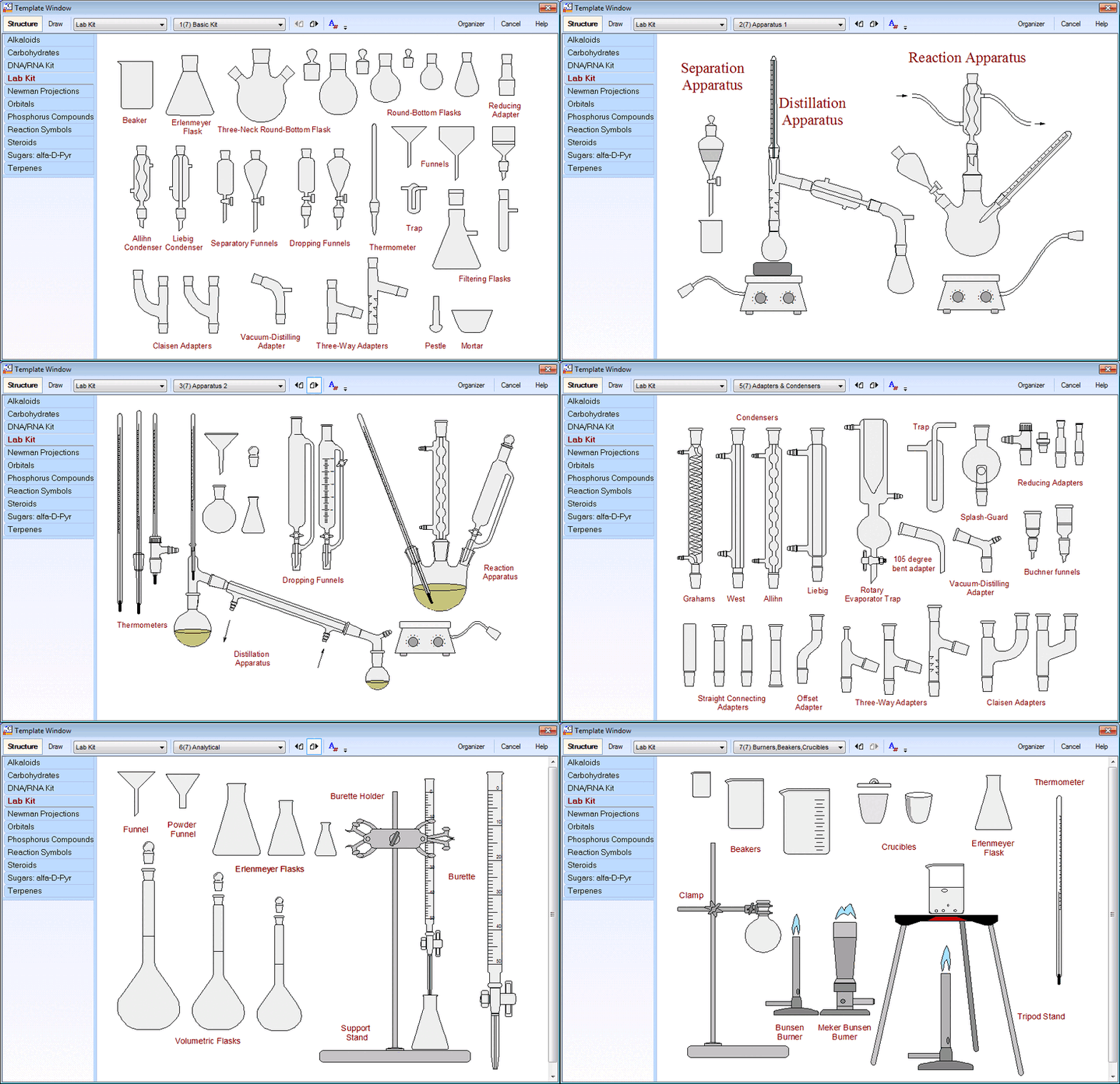
A distillation:
ChemDrawoffers templates which may be bitonal, or in color (see, e.g., here. Primarily written for Windows and Mac, with only varying success to be deployed in Linux, the program is widely used in academia and industry (definitively not for free as in free beer, often accessed within a campus license). The templates include parts aligned to fit better into the round bottom flasks. Among the export formats are
.pngand.svg. The later allows you e.g., to adjust the fill and stroke of the paths, or to remove the ace label (which actually is a trade mark of Ace Glass, NJ).With many chemistry-relevant functions removed, the ChemDraw JS page allows to get familiar with them (stamp button opens a pull-down menu), to save the drawings in the native format (Structure -> Get .cdxml), as .png (-> Get image) or vector file (-> get .svg).
Some of the templates:
(image credit to a Russian blog post)
A distillation (color adjustments with Inkscape):
ChemDoodle is the youngest of these three sketchers with the largest number of lab utensils in the template library. Capable to interact with many chemistry-relevant file formats (including thepublic .cdxml of ChemDraw), the export of the graphics includes many optionsfor round-trip edits, and export e.g., as either
.png, or (optionally layered) vector format (.svg, .ps, .pdf) and anticipate their use in web pages and services like twitter. The purchase of one of their licenses offers the user to choose between a program for Windows, or Mac, or Linux; this includes the option to shuttle the license key among the operating systems.An overview of the chemistry templates:
With light retouches in inkscape, an illustration of a short-path distillation:
Contrasting to the programs above, chemix's focus is about drawing a lab setup exported either as bitmap or vector file. (Maybe drawing organic structures will be added.) By number, the inventory of lab utensils (still) is smaller than e.g., the one offered in ChemDoodle, though it contains material absent in the other collections (e.g., a waterless condenser, or the GHS symbols).
In addition to standard options to move and scale the objects, there are interesting details in handling the objects like (incomplete list):
The green arc sign in the illustration below mark utensils you access when entering a paid subscription. Based on their twitter feed, there is continuing development and addition of utensils for this application running remotely in your web browser.
An illustration:
The comparison with the utensils in the lab may reveal differences between the sets offered (e.g., Chemix' missing pressure release for a distillation present in Chemsketch and ChemDraw's sets/how you should mount safely a distillation) may be seen; thus, design with care for detail.
More
VOTE
VOTE
VOTE