At present you are attempting to call a directory /data, which doesn't exit. If you type ls /etc that will work. The difference between ./data and /data in a file structure is alot, but on a command line it appears minimal.
Wait ... if that doesn't work .. because I suspect the calling directory is data then the following will,
At present you are attempting to call a directory /data, which doesn't exit. If you type ls /etc that will work. The difference between ./data and /data in a file structure is alot, but on a command line it appears minimal.
Wait ... if that doesn't work .. because I suspect the calling directory is data then the following will,



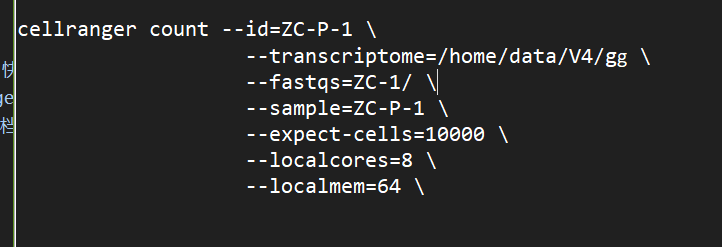
I repro the error.
If run
I suspect it will work.
At present you are attempting to call a directory
/data, which doesn't exit. If you typels /etcthat will work. The difference between./dataand/datain a file structure is alot, but on a command line it appears minimal.Wait ... if that doesn't work .. because I suspect the calling directory is
datathen the following will,OR
It depends on the path where you are making the call. You could sort this out using
$PWDor justecho $PWDthen copy and paste the path name.I repro the error.
If run
I suspect it will work.
At present you are attempting to call a directory
/data, which doesn't exit. If you typels /etcthat will work. The difference between./dataand/datain a file structure is alot, but on a command line it appears minimal.Wait ... if that doesn't work .. because I suspect the calling directory is
datathen the following will,OR
It depends on the path where you are making the call. You could sort this out using
$PWDor justecho $PWDthen copy and paste the path name.More
VOTE
VOTE
VOTE